
Menu
Let's get started.
Three steps get you ready for your first treatment.
1
Charge your Zerigo device.
Make sure it's fully charged. A full charge usually takes about 4–8 hours.
2
Download the Zerigo Health app.
Sign in using the same email address you used to enroll with Zerigo Health.
Allow Bluetooth access when prompted. You'll need it to connect the app to your device.

3
Watch your onboarding videos.
These play as you move through setup in the app.
Make sure you're connected to Wi-Fi during your first treatment.
Two quick videos
Start here
A quick look at phototherapy and your device.
Unboxing video embed goes here
Unboxing your Zerigo device
See what's inside the box.
Phototherapy video embed goes here
How phototherapy works
How NB-UVB light treats chronic skin conditions.
Connect your device
Bluetooth pairing resources
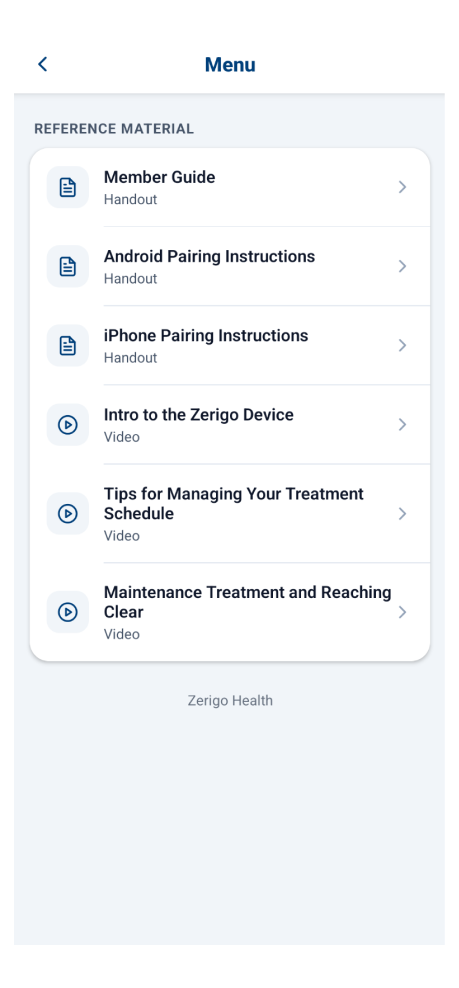
Step-by-step guides to pair your device with the Zerigo Health app.
Help is built in
Stuck?
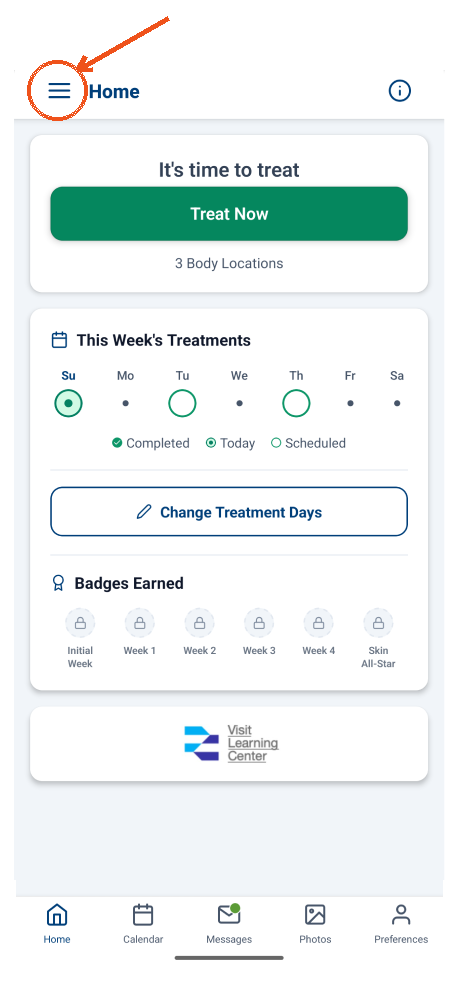
Tap ☰ on your Home screen, then open Reference Material for guides and videos.
Still need a hand?
Real people, real support. Reach out and we'll get you unstuck.